
What you’d expect.
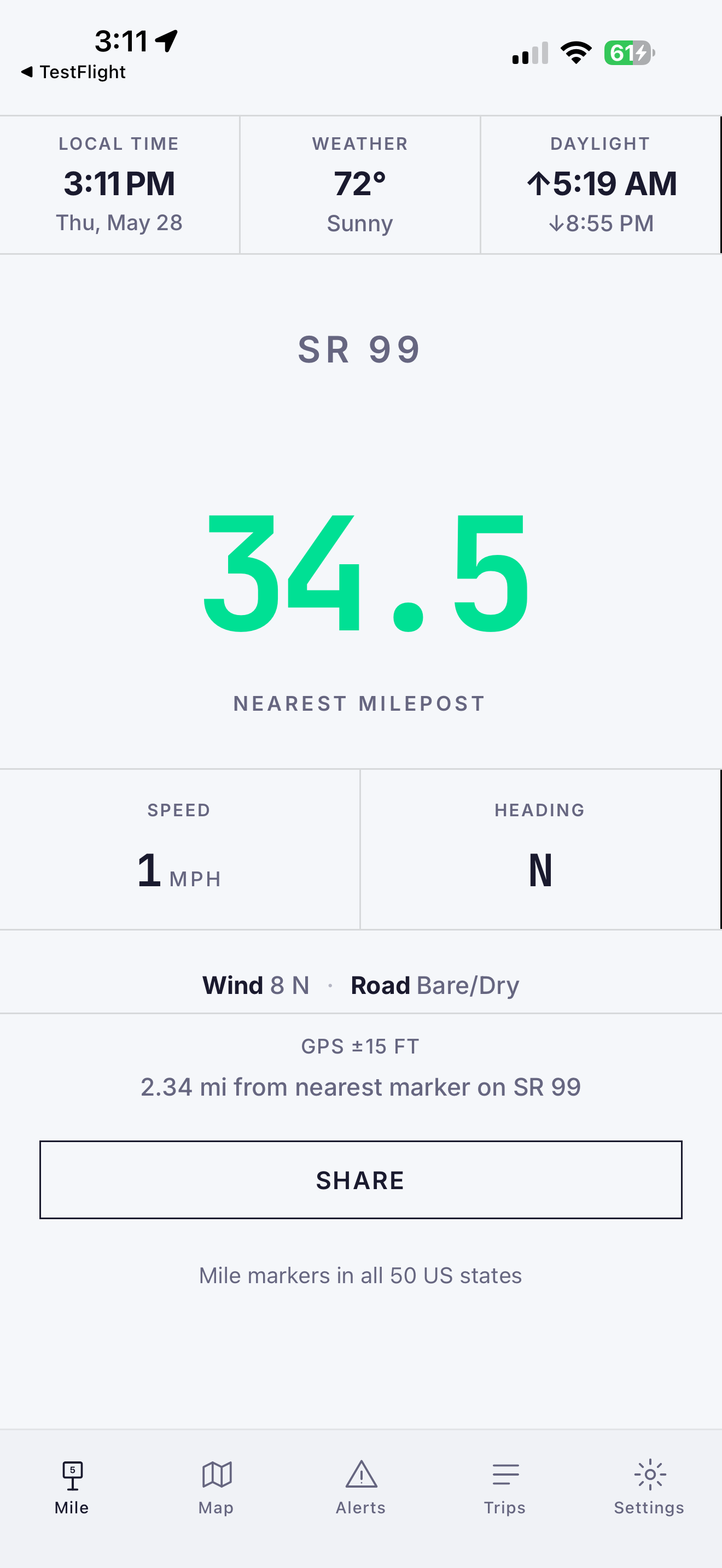
Your nearest mile marker, live (all 50 states) · live DOT alerts · works offline · live map · GPS speed.
iOS · ANDROID · ALL 50 STATES
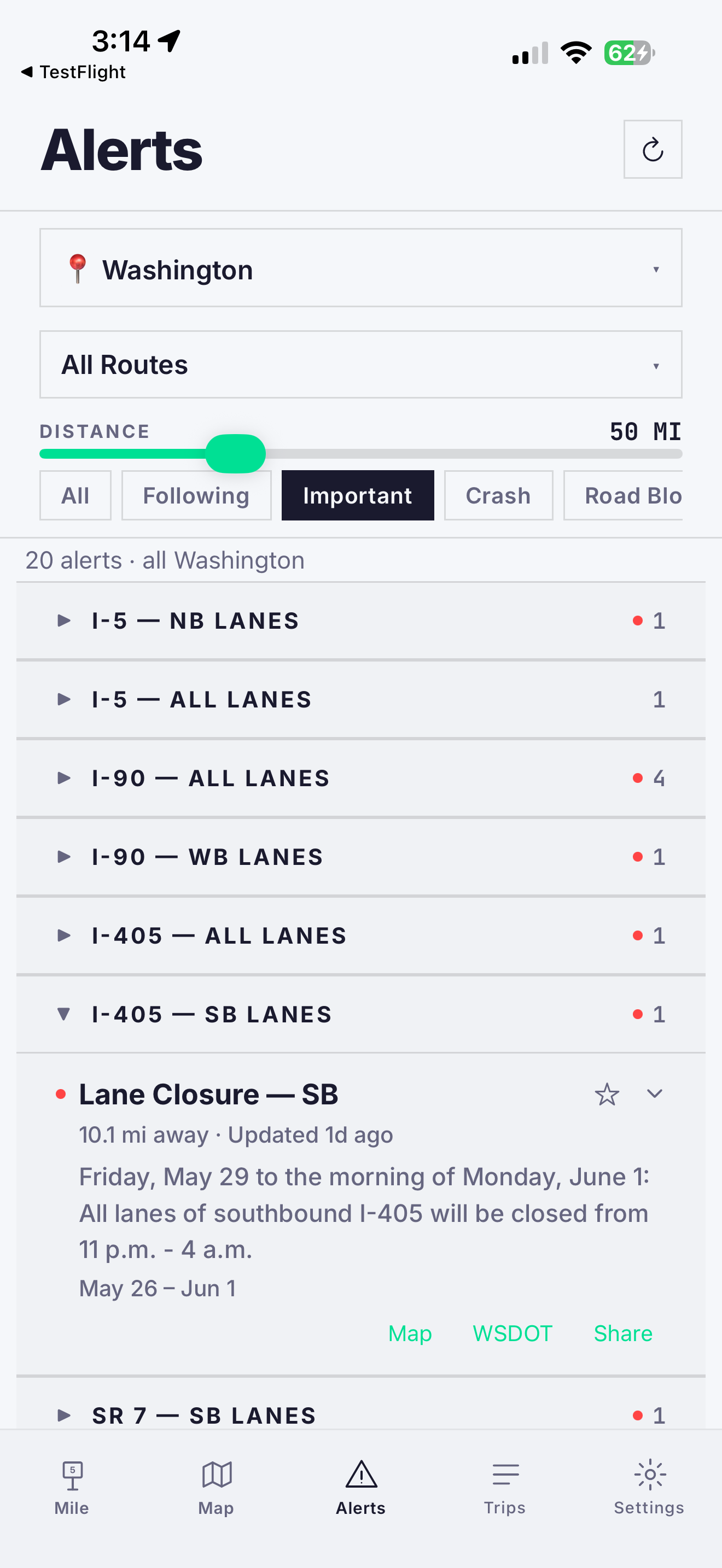
Your nearest mile marker, live — plus road alerts from all 50 state DOTs. It’s how help finds you.
Now on CarPlay & Android Auto
Your mile marker is always free. Premium — map, live alerts, trip tools — $9.99/yr or $1.99/mo, 7-day free trial.
Real-time mile markers (50 states) · Live DOT alerts (50 states) · Border wait times · Seattle bridge status · Crosswind warnings · Works offline
Your nearest mile marker, live (all 50 states) · live DOT alerts · works offline · live map · GPS speed.
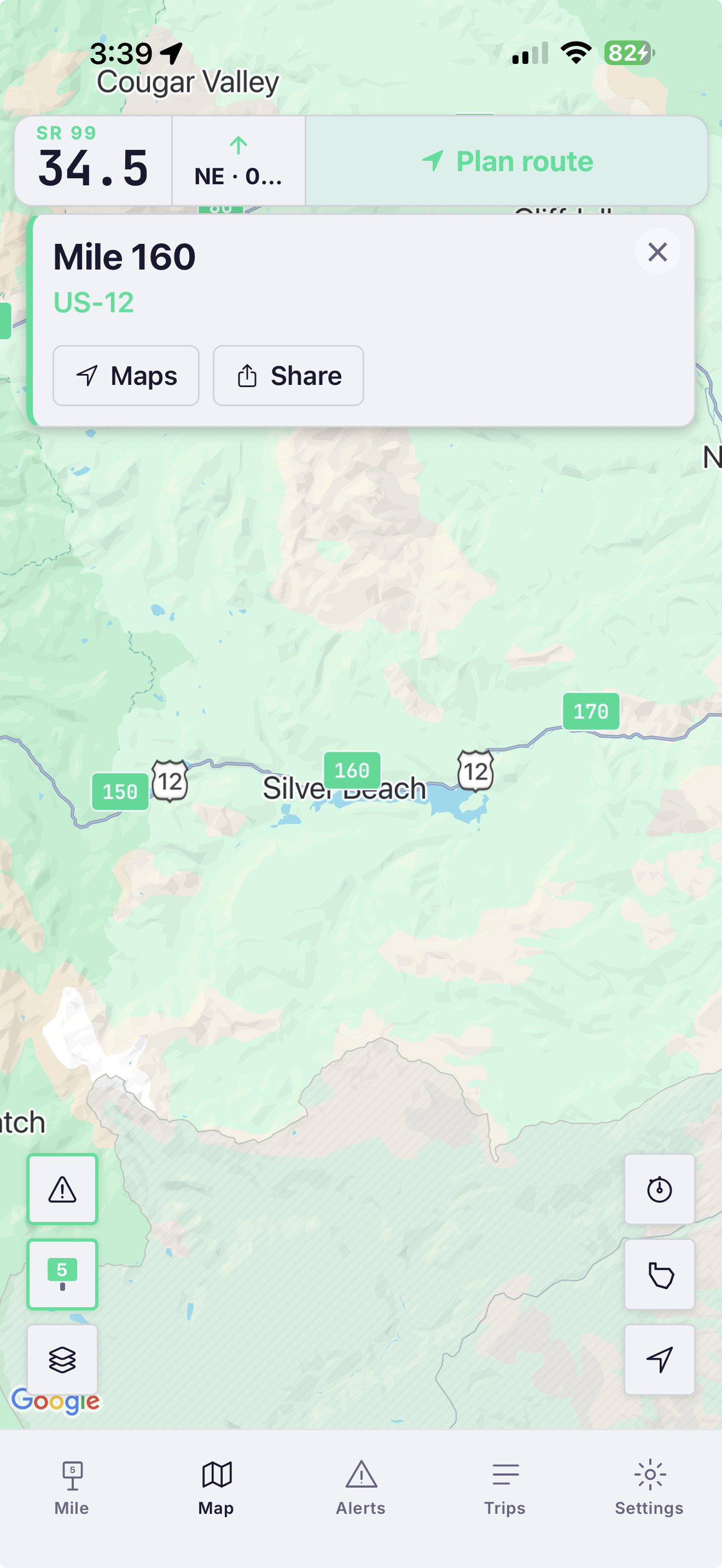
Border wait times · Seattle bridge status · crosswind warnings · trip logging · share your location · navigate to any milepost.
CarPlay and Android Auto show your highway, mile marker, and road conditions — glance-and-go, free for everyone.
Plan a corridor, see it drawn on the map, and get the alerts that are actually on your route — with an honest ETA.
The only mile-marker app on both iOS & Android with live, nationwide DOT integrations (50 states) · the only CarPlay & Android Auto app that shows your mile marker · the only highway data layer tracking America’s drawbridges — live status and every federal opening rule.
Free highway intelligence on the web, built on the same data as the app.
Browse the mile markers of any highway in all 50 states, straight from the data the app runs on.
→ ● LiveEvery current highway closure from 50 state DOTs on one national map.
→ ● LiveLive DOT cameras in 27 states coast to coast — see the pass before you drive it.
→ ● LiveHow full is the next boat? Live drive-up space for Washington State Ferries sailings, straight from WSDOT.
→ ● LiveLive Seattle & Florida bridge status, plus every US drawbridge’s opening rules — 26 states and counting.
→ ● LiveLive waits at every US land crossing — passenger and commercial, both directions.
→ ● LiveEvery active fire with acres and containment, plus the live road closures fires cause.
→ ● All mapsThe full set — state drawbridge pages, the fire map, and everything above in one place.
→Live cameras and road conditions for the highways, passes, and states drivers search most.
See a whole interstate right now — I-5, I-75, I-95, I-15, and more, tagged with mile markers.
→ ● 9 passesSnoqualmie, Donner, the Grapevine, Siskiyou, Cajon — see the snow before you drive the summit.
→ ● 22 statesLive traffic cameras for your state — Washington, Florida, California, and 19 more.
→ ● GuideHow mile markers work, how to find yours right now, and why 911 and tow trucks ask for it.
→ ● GuideBroke down on the highway? Exactly what to tell 911, a tow, or roadside assistance.
→Highway basics: mile markers vs exit numbers · how interstates are numbered · US highways vs interstates · what highway sign colors mean · what “chains required” means
No sign-up, no email, no phone number — just open it and drive. Your mile-marker lookup and trip history stay on your phone. Optional connected features — route planning and wildfire alerts — use location as explained in our privacy policy. We don’t sell personal data and there are no ads.
If you drive Seattle, MileCheck shows the city’s drawbridges — Fremont, Ballard, Montlake, South Park, and 1st Ave S — raised or lowered, live on the map, so you can see if the bridge is up before you’re stuck behind it. Headed over the mountains? You get Snoqualmie and Stevens pass conditions and chain controls, straight from WSDOT.
Premium adds the live map, DOT alerts on your route, route planning, and trip tools. 7-day free trial, cancel anytime. Early subscribers keep their price.
It shows your nearest highway mile marker in real time, anywhere in all 50 states — plus live road conditions and alerts pulled straight from state DOTs. You always know exactly where you are, and what’s ahead on your route.
New to mile markers? Mile markers vs. GPS — why both still matter →
Mile markers in all 50 states. Live DOT alerts in all 50 states.
Yes — mile markers are stored on your phone, so they work in dead zones. Live alerts need a connection.
Your current mile marker is always free. Premium — the live map, DOT alerts, and trip tools — is $9.99/yr or $1.99/mo, with a 7-day free trial.
Yes, both — and the car screen is free. It’s deliberately simple right now: your highway, mile marker, and current road conditions, glance-and-go. Just the one thing you need while driving, with no clutter. A richer car screen is on the way.
Yes. The 50-state milepost corpus and the live 50-state DOT alert layer are available to license — one schema, one API, no state-by-state agency negotiations on your side. Fleets on Geotab can add MileCheck today from the Geotab Marketplace. For API access or fleet licensing, email info@milecheckapp.com — details on the B2B page.
Newsrooms and public-interest sites are welcome to embed our live maps or cite the data with credit and a link — just tell us where it’s running. Any commercial use of the data or maps — inside a product, service, or paid publication — requires a license first: info@milecheckapp.com.

Roy is MileCheck’s road-crew foreman — named for the dad who first showed me that on a highway, everything comes back to the mile marker.
He works nights, distrusts unmarked detours, and takes road conditions personally. Every so often he drops by with a reminder: check the cameras before the pass, know your mile marker before you need it, turn on fire alerts for your area.
Reminders from Roy · on our InstagramMy dad took a seasonal job driving snowplows for ODOT. Before long I realized how much of that job revolves around mile markers — every radio call, every crash report, every road closure. They’re how crews track where sand, salt, and brine have been applied, and how dispatchers coordinate a response.
If you call for help on a mountain highway, how do you tell anyone exactly where you are? That’s what mile markers are for. Most drivers pass hundreds of them without a second thought. But the people who keep roads open, respond to emergencies, and help stranded motorists rely on them every day.
There was one app for this, but it only worked on iPhone. My dad uses Android. So I built him a web app that showed his nearest Oregon mile marker from GPS. My mom, my sister, and I spent hours driving highways and back roads, checking numbers, making adjustments. I still remember the first time the number changed at exactly the right moment.
My dad showed it to coworkers. They showed it to others. Feedback came from truck drivers, road crews, first responders, and everyday drivers. Nearly every feature in MileCheck exists because someone on a real road asked for it.
What started as a simple tool for my dad turned out to be useful for a lot of other people, too.

Find your milepost free — it’s how help finds you.
GET THE APP →FOR PLATFORMS AND PARTNERS
Most milepost data products stop at the static layer: “where is MP 142?” MileCheck delivers both — that milepost lookup plus live conditions at MP 142 right now, normalized from 50 state DOT feeds across 19 distinct upstream platform formats. One schema. One API response. No state contracts on your side.
Open a conversation →Live on the Geotab Marketplace — the fleet add-in runs in MyGeotab today · data API by license.
GPS didn’t retire the mile marker — it exposed how much emergency response, dispatch, and the entire highway data system still depend on it. The evidence is primary-sourced:
“When calling #77 or 911 for emergency assistance, providing the information on a mile marker sign will help responders reach you quickly.”
— Virginia DOT, official guidance
The FCC requires carriers to deliver an accurate location for only 80% of wireless 911 calls — and highways are the worst case, where cell towers line up in a row and triangulation fails.
— FCC E911 location-accuracy rules
Google and Apple Maps deliberately omit mileposts — Google’s own support threads tell users there’s no setting, and to use a dedicated app. The one number a responder needs is the one consumer maps won’t display.
— Google Maps support
DOTs locate nearly everything — crashes, work zones, signs, 511 alerts — by route + milepost. Since 2014, FHWA’s ARNOLD mandate requires every state to maintain milepost-referenced inventories of all public roads.
— FHWA ARNOLD / Linear Referencing
Every interstate, US highway, and most state routes across all 50 states — sourced from official state DOT and government GIS records, never crowd-sourced. Quality-checked, normalized across state-by-state inconsistencies, and interpolated to one-tenth-of-a-mile precision between markers. Continuously updated as states add, reclassify, and re-route highways — a living dataset, not a one-time export. Bundled offline in the app; available as a structured dataset for integration.
50 state DOTs integrated and growing, each a different upstream platform format. A serverless dispatcher normalizes every source into a single consistent road-conditions and incident schema, with caching tuned per source and resilient fallbacks for agencies with restrictive access.
The first consumer nav stack where a mile marker is a destination, not a display element. Tapping a milepost in the map hands off to Google Maps, Apple Maps, or Waze with the milepost coordinate as the routing target. Direct workflow value for dispatch-to-driver handoffs in fleet, roadside, and emergency-response use cases.
Live on CarPlay and Android Auto. Apple’s Driving Task entitlement requires a separate navigational utility review — it’s not a standard developer-portal option, and most transportation apps don’t qualify. MileCheck passed that review. The same data layer that powers the phone experience ships to the vehicle screen.
Beyond DOT alerts: live commercial border-crossing wait times for all supported CBP land crossings (commercial and FAST lanes, direct from CBP), plus live movable-bridge open/closed status — hyper-local, time-critical signals no consumer map surfaces. Live drawbridge status runs in Seattle and Florida (state DOT sensors) with Louisiana road/marine status behind it — and the federal opening rules for 800+ regulated US drawbridges are already normalized in the corpus, published as state-by-state web maps.
That’s how drivers report location. Telematics logs GPS coordinates — so dispatch can’t plot the one format drivers actually use without a manual lookup. We’re the translation layer.
Adding a milepost layer yourself means fifty state negotiations and a pipeline to keep it current. Most platforms skip it. The corpus is licensable today.
Cross-state alerts live in 50 incompatible DOT systems; aggregating them yourself means bilateral agreements with every agency on the route. We already normalized all 50.
No native equivalent in consumer nav — drivers send approximate pins, dispatchers guess. Plus live commercial waits at supported land borders, an input no fleet platform surfaces today.
Stranded drivers report a mile marker; most dispatch systems demand a street address. The workaround is literally asking a stressed driver to go find a sign. We turn the marker into a routable point.
Your board already receives that call. Plot it automatically — and flag whether that stretch is closed or under chain control right now. One API call, zero state-DOT contracts on your side.
Watching conditions across a border means separate logins, schemas, and feeds per neighbor — the perennial unsolved consortium problem. One feed, every neighboring agency, one schema.
If your operation speaks “route and milepost,” the layer drops into your stack — live conditions included, production-proven — live on iOS and Android.
Open a conversation →MileCheck runs alongside your routing or weather stack: direct-from-state-DOT road events — closures, construction, crashes, chain controls — tied to the exact mile marker. It’s privacy-light by design — no driver accounts, and the vehicle’s location stays in your platform, not on our servers. A coordinate-to-milepost lookup is available elsewhere — the live conditions at that milepost, normalized across 50 agencies and running in production, are the part that’s hard to copy.
Proven in production through the MileCheck iOS, Android, CarPlay, and Android Auto applications.
Validated continuously by a nationwide tester network — real drivers across the country who flag issues in the field, so a data problem surfaces before someone hits it in an emergency. Automated per-source monitoring catches the feeds; the testers catch the road.
↗ Live API status · DOT feed uptime monitored 24/7
MileCheck solved this once, in production, for a consumer app live on both stores. The platform is available to license today — no agency negotiations required on your side.
The unified DOT alerts feed — direct from 50 state agencies: closures, construction, crashes, and chain controls — plus live commercial border-crossing waits from supported US land crossings (CBP), served through one normalized endpoint.
The 50-state milepost corpus as a static dataset or continuous sync, shaped to your schema.
Mile-marker display and DOT alert integration embedded directly into your existing driver app.
Co-engineering a vertical use case on top of the highway intelligence layer.
A MileCheck corridor board turns any TV in a truck stop, travel center, diner, or gas station into a live dashboard for the highway outside your door — closures, crashes, chain controls, and weather for your stretch of interstate, updating around the clock from the same direct-from-DOT layer that powers the app.
The board is free. We configure it for your corridor and your location — drivers walk in, see exactly what's ahead on their route, and your venue becomes the place that knows the road.
One sponsor slot per screen — your brand alongside the one piece of information every driver in the building actually came in wondering about.
Any screen with a browser — no hardware to buy, nothing to install or maintain. The board is a live web page that keeps itself current.
To put a board in your venue — or your brand on one — email info@milecheckapp.com.
For partnership and platform inquiries, contact info@milecheckapp.com.
Already run a fleet platform? MileCheck drops in as an Add-In.
It installs inside MyGeotab and Geotab Drive as an Add-In — the driver’s live mile marker and direct-from-DOT alerts, right in the dashboard. Same normalized data layer, no rebuild on your side.
The Monthly Road Report
Real numbers on what actually happened on America's highways last month. Once a month. No spam.
Free to find your milepost. Premium comes with a 7-day free trial.
DOWNLOAD ON THE APP STORE GET IT ON GOOGLE PLAY